Followers

Saturday, August 12, 2017

Dream catcher

Hi Copic lovers; welcome to Copic Marker Europe Blog.


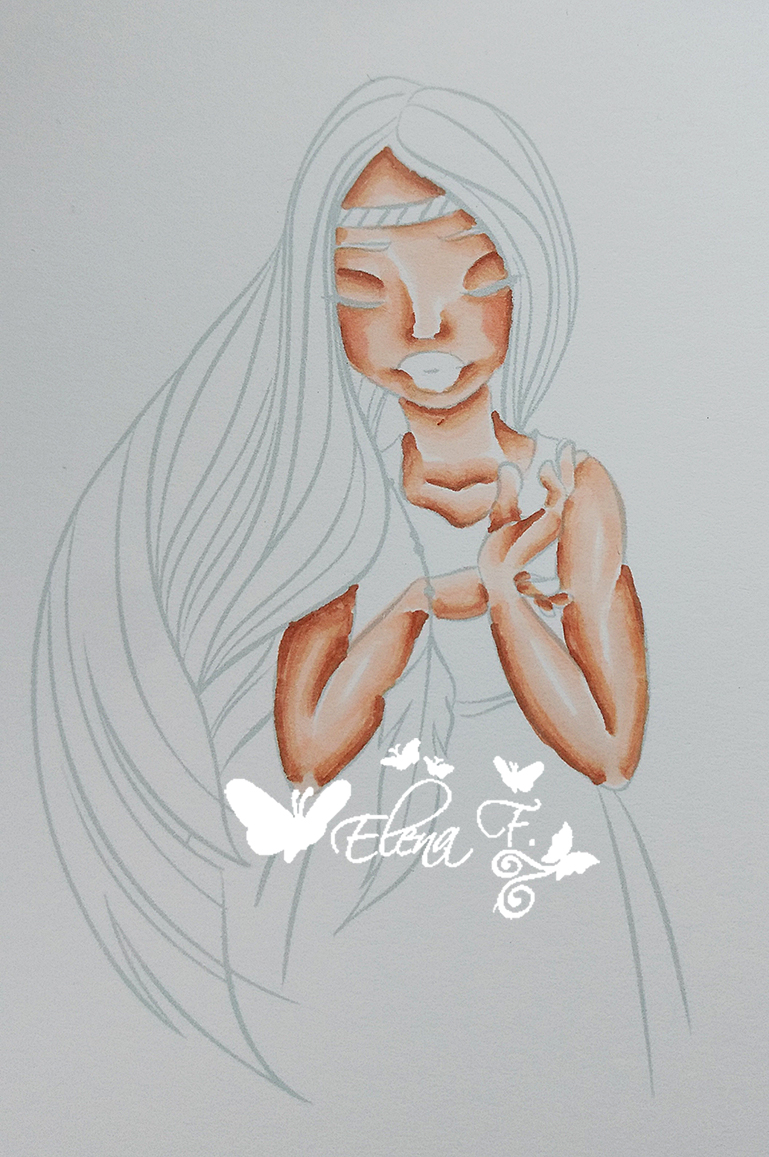
For my DT inspiration, I made a Dream Catcher for my little one using a Saturated Canary image (....She doesn't sleep soooo good so I tried this Indian Catcher to see if this works.....if not....well it's a pretty hanger no???)  using the "no lines colouring technique" again.


Yes; I love this technique to colour so much. You can check how to do it on this Blog's Tutorials.


This is the finished project, but after that, you've got  step by step pictures on how I coloured her as always.


I started colouring her skin with my favourite combo using E0000, 00, 21, 11, 13 and a bit of R20  for the cheeks.


I drew over the eyes in GREY Copic Multiliner.

For her hair I first mark the darker areas with E18 but I did it BY SECTIONS.


Then E15.


...and I missed a couple of pictures on colouring her hair, but I did the same steps in the long section of her hair.


My final marker to colour her hair is E13 for lightest areas....then repeat steps until you're satisfied and you've got the desired depth of colouring.


Her dress colouring in steps, using YR24, Y21, YR31 and YR30 from darkest to lightest marker.


Then repeat, repeat, repeat these steps to get the desired depth of colouring.

I went a bit pinky for her lips with E04, RV55 and RV52 and I drew over some zones of her hair in SEPIA 0.3 Copic Multiliner.


Finally I coloured the feather in greens using G94, YG63, 61 and BG13


Here is the list of markers I've used:

Skin: E000, 00, 21, 11, 13
Lips: E04, RV55, 52
Hair: E18, 15, 13
Dress: YR24, Y21, YR31, 30
Feather:  G94, YG63, 61, BG13


Hope I've inspired you.
Thanks for getting to the end.
Have a nice day all.
Elena F.

Saturday, August 5, 2017

A Card for Teacher

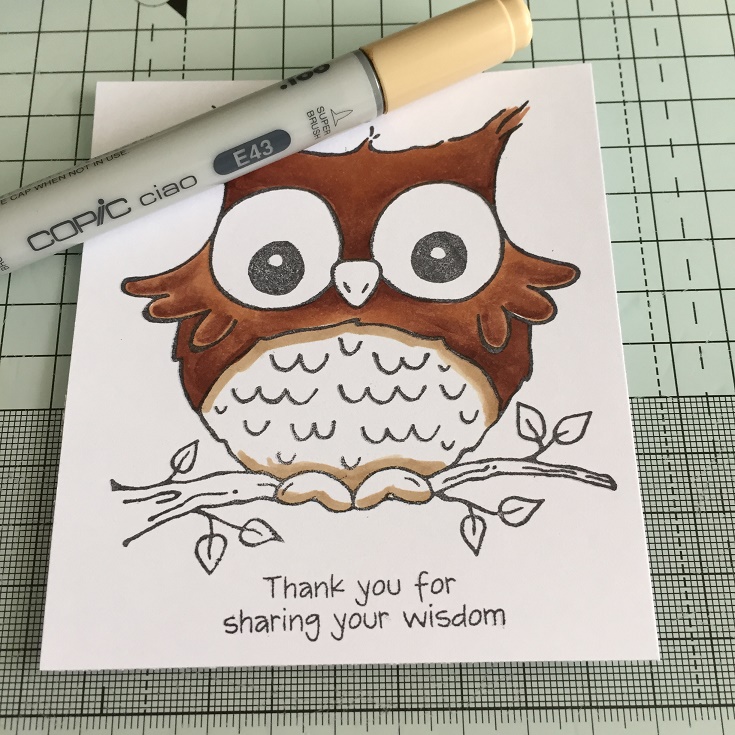
Hi everyone! It's Sandie here today with a card for a Teacher. It could also be a Thank You card for someone who is not a teacher. The stamps is What a Hoot from Woodware. 


I stamped out my image onto Perfect Colouring Paper using Memento black ink. 


On this stamp I applied my colours dark to light. I started with E27


Next I added E25


and finally, E23. I went back in with each of the colours until I was happy with it. 


For the bottom part of the owl, I used E40's, again working from dark to light
I applied some E43 around the edges


Next, E42


and then E41. Once I had this part blended, I applied more E43 on the edges to give it some depth. 


On the beak, I applied some E43


I applied some N5 to towards the bottom, and blended it out with with the E43 and the around the edges of the beak, I used E41


On the branch I used, E21, E33, E35


For the eyes I used Y13, Y15, Y17. Starting with the Y17 I did a thick line around the outside edge. 


I used the Y15 to drag out the Y17 and left some white space around the pupils of the eye. 


I blended the eyes with Y13 and brought the colour right into the middle. 


Finally, for the leaves I used YG03, YG25, YG63


This is my little owl completed. Before adding him to the card I applied some white gel pen to the eyes and around the body. 


Thanks for looking!
Sandie

Friday, July 28, 2017

Princess mini album

Princess mini album


Hi Copic lovers; welcome to my post for the Copic Marker Europe Blog.


This entry is my first as a DT Member for Copic Marker Europe……. Yes…. I'm the newbie  ;)

Well… I need to admit It was completely unexpected for me but I'm so pleased and honoured (…and a bit scared) on being asked to join this team.

Thanks team for having me.

In my first DT entry I made a Mini Album (I'll show you the entire project on my Blog) using one Saturated Canary image coloured with Copics using “the no lines colouring” technique; you can check how to do it on this blog's tutorials.


This is the finished project; a mini album for my oldest daugther to put some pictures taken on Eurodisney. I tried to colour the dress closest to the princess costume she was wearing. The only different thing is she doesn't have blue eyes ;)

I'll show you a step by step on how I coloured her. I took a several pictures during the process.......but we all enjoy sooooo much colouring and many times we forgot to take some pictures through the colouring process...Since we concentrate too much on coloring......so, I could have missed a picture :)


As almost always I've coloured her skin with my favourite combo using E0000, 00, 21, 11, 13 and a bit of R20 + 22 for the cheeks.

 Eyes B95, 91 and B000.
Carefully and with patience I drew over the eyes with a black Copic Multiliner 0.10 after colouring her skin and the inside of the eyes. this way we emphasize her look.

Lips: R05,02,YR02 (really love oranges on lips) and a bit of R20+22 for cheeks.

For the hair, I love to first mark the darker areas with my darker marker.


 ....and repeating steps until you're satisfied and you've got the desired depth of colouring.
 To colour the skirt I've used E71, 70, W1 and  R00.


 Then I've used Gellyroll pens in white, silver and clear adding dots to the skirt to add more texture and shine to the dress.
 I decided to colour a bit darker the bodice of the dress so I went with E74, 71 and 70.
 ...and after a million dots in white, clear, silver.....and a bit of gold in deepest fold between the skirt and body.....I've got  her dress finished and really shiny.
For the gloves: At first I thought I'd colour the gloves in white, but I realized I'm on vacation and I don't have all the range of markers with me. So finally I decided to colour them in a pearl grey, finishing again with a lot of mini dots with a white Gellyroll pen.


Here is the list of markers I've used:

Skin: E000, 00, 21, 11, 13
Lips: R05,02,YR02
Eyes: B95, 91, 000
Hair: E25, 23, 53
Dress skirt: E71, 70, W1, R00
Dress bodice: E74, 71, 70
Gloves:  C5, 3 , 1 


Finally I fussy cut the image to emphasize her on my finished project.


Hope you like it.
Thanks for getting to the end.
Have a nice day all.
Elena F.

Tuesday, July 25, 2017

Shading and Blending with Gray Markers

Hi Friends!!

Cicci Here from Sweden, This is my first post for Copic Marker Europe, and Today I'm showing you how I use the Grey Markers for some shading and how to get some depth in the colouring. It's great to use this if you don't have so many Markers, maybe you just have two red Markers and you want to have some more depth in your colouring? Add Grey Markers to them and you got great colouring.
 If you are new in this Copic world and don't have all the Copic Markers, don't worry..buy some greys and you can colour really nice stuff, just with a few Markers.
I have almost all the Markers BUT I think the grey family is great to use anyway:0))

I have used an Image from Emmanuelle Colin to show you how I colour this face,
 with Cool Grey markers.


I have used the Grey Markers for the shading/blending 
C3 C5 C7 C1 C2 C0 and a little C10.

Ordiary Skin Combo: E50 51 53 11 13 R20
Hair: Y21 23 E15 
Eyes: Y21 YG17 G29
Leaves: Y02 YG17 G29
Dress: B000 B00 FBG2 
Lips: RV52 
Flowers: V12 15  FBG2 B000 RV52 RV00 FB2 C2 C0
Background: Various Ink B000 26 RV00 YG03 Y02  C3 C2 
White Posca pen for the dots


Step 1
 I started to colour in the place I want to be darker in the face with C3


Step 2 
 Continue with C5. I just colour on the same area that I have coloured with C3
(you can start with the darker Grey Markers as well, but remember it's easier to start with the lighter, because if you make a mistake with the light Marker it's easier to fix the mistake than with a darker Marker)


Step 3
Then I blend those colours with C3 2 1
 I'm doing this with circle movements. After the blending,
 I also add some strokes with C7 and a little C10  on the place I want to be darkest in the face


Step 4
Time for blending out the C7 and C10 with circle movements with the Copic nib. I start with C5 and after that I blend with C3 C2 C1 . I continue with the blending until I don't see any lines left or very little lines :0)
In the end of this step, I make some long strokes over the area that's still white in the face and I use C1 and C0 for this. You can see how much I have added on the white area with the Grey Marker.


Step 5 
Now I start to colour with the ordinary skin colours. 
I have used  E50 51 53 11 13  R20

Now I'm just adding the ordinary skin colours. If you want to try this you can use the combo that you like for the skin. I often use this combo for the skin. If I don't use grey I'm sure I have added some E04 instead. But this time I just use the Grey Markers.


Step 1
Add E50  On the grey area


Step 2
Add some E51 on the same area as you coloured with the E50
                  Add some E13 and blend out with E11

Step 3 
Add some E53 near the hair and blend with E51 and E50
After that I just want to put the colours together and I used E51 and E50 for that.
 I colour with light long strokes over the whole area on the face, first with E51 and then E50
When that step is ready I have added more of the ordinary skin colours, also some R20 for the cheeks and after every added colours, I have blended with lighter Markers. 
I have not taken photo of every stage, because this turtorial would be very long, if I have showed every step here.


DONE !
Good luck and hope to See you again in August

HUGS and have a Great day!!