Followers

Monday, November 12, 2018

Sweet November "thanks" card with 3d elements


Hi all Copic friends,

Today I have prepared a "thanks" card,
with some 3d elements.

I dedicate this card also to all kind readers of this blog.
(and people that leave comments, it is always nice to get feedback) 

Are you ready ? Please sit down and relax watching.
Here we go!


To start I have printed the digi with the fairy twice.
This was an exclusive digi designed by Amy Young (not only an excellent colorist).

 I have also cut a sheet of Perfect Colouring Paper with a ticket die.
 (this will become the background).

Now I have put the die cut piece of PCP onto my stamping tool, 
and the hand cut fairy was put on to that piece of paper with some magnets.

Now I have stamped my clear stamp with some little toadstools
 onto the paper with fairy with grey ink.

On the wings of the fairy some small details of the toadstools will show with grey ink.

Once the fairy was taken off the sheet I have repeated to stamp the toadstools but now with black ink.

In this way you will have a black version on the sheet
 and a grey version on her wings to make the wings look transparent.


One fairy was hand cut in one piece.

Okay now it is time to take the second fairy and cut just some pieces of the fairy.
(the pieces you want to lift later , to create a 3d effect).

I have chosen her arm attached to her head as one piece,
and a piece of her skirt.

You can put these pieces aside until later.


I have first started to colour the background.
The toadstools were coloured with the november colours 
E 37, R 37 and G 99.
I have seen these colours on the american Copic site.


I have also coloured the cloudy sky,
 using B 21 and B 23, C 2 and C0 and the blender.
In the wings I have used the lighter colours B 21 and C 0 in this way the wings seem to be transparent.
The same with the toadstools in the wings I have chosen not to use the brown but only red.

The grass was coloured with G 94 and G 99.


Time to colour her face, 
of course I will only completely colour the separate face that will be layered on top. 
The face of the complete fairy will only get some colour on the edges.

skin : E 00, E 11, E 13, E 95, E 04


Green eyes with YG 91 and YG 95


Now it is time for her dress,
again you have to colour the pieces that will be on the top layer only.
Here you can see her arm, the top piece of her shirt and the "skirt",
the lower pieces will only get some colour on the edges.

Love these colours from the YR family : YR 23, YR 24, YR 27
and for a dark shading I have used E 18.


The wings got some YR 23 on top of the sky and toadstools,
after I have added some deco glass pasta "moondust" with a pencil to the wings.

Under the skirt I have added some small foam pads and glued it to the fairy.


Here you can see that the fairy is not flat.
I have attached some foam pads under the "skirt",
some on the right side of her head and on her left shoulder,
the hand was glued onto the lower hand.

I have also coloured her hair with
E 23, E 25, E 47, E 49
this was a suggestion of Amy the designer of this cutie.


The dots of the toadstools and her hair decoration got some extra sparkle,
on top of the glue I have added some glitter.
Later I have decided to give an extra sparkle to the wings too.

Thanks, Grazie, Bedankt !


Digi stamp : Sweet November exclusive digital stamp by Amy Young 
Clear stamp : Studiolight Diny's Signature Collection, 
Dies : Studio Light

Copic :

skin : E 00, E 11, E 13, E 95, E 04
hair : E 23, E 25, E 47, E 49
clothes : YR 23, YR 24, YR 27, E 18
toadstools : E 37, R 37 ,G 99, E 00, E 31, E 18
grass : G 94, G 99
sky : B 21, B 23, C 0, C 2, "0" blender
tags : YR 23, YR 27

Thanks for your visit,
hugs Blankina

Sunday, November 11, 2018

New Instructors

Good Morning :)

A few weeks ago, the European Copic Instructors got together for the annual Copic Convention, hosted by Holtz Office Support, the European Distributor for Copic. 

As usual, we were completely submersed in all things Copic, enjoying training, presentations, a creative day, lots of chatter and  a fair amount of chocolate coffee.

At the end of the meeting, we were delighted to welcome two new Instructors to the team and we would like to introduce them to you now...

Cordine van der Touw
Regional Copic Instructor; Belgium, Netherlands, Luxembourg

You can find Cordine in the following ways:

Petra Zemankova
Regional Copic Instructor, Czech Republic

You can find Petra in the following ways:

If you are local to any of the areas covered by Cordine or Petra and you are interested in Copic Classes, please contact them.

Siv Anderson, Cordine van der Touw, Peter Holtz-Kathan

Siv Anderson, Petra Zemankova, Peter Holtz-Kathan

Siv Anderson, Cordine van der Touw, Petra Zemankova, Peter Holtz-Kathan

Peter Holtz-Kathan, Faye Wynn-Jones, Cordine van der Touw, Siv Anderson

Welcome Cordine and Petra. Wishing you every success :)

Saturday, November 10, 2018

Classes in Italy

Hi there :)

We have some new class dates for classes with Anna in Italy, as follows:

Rita Sperduti 

Via del Casale del Finocchio 46, Rome (borgata Finocchio) , info / booking  06 - 20 76 16 23

ECCP 1 - Monday 19 November; 9.30 - 12. 30


 ECCP 2 - Monday 26 November; 9.30 - 12.30  


 ECCP 3 - Monday 03 December; 9.30 - 13.30  


 ECCP 4 - Monday 10 December; 9.30 -13.30  


*****

L'officina dell'arte

Piazza San Giovanni in Laterano 56, 00184 Rome , info / booking  06-70 49 52 59 or innocenziritacart@libero.it

ECCP 1 - Saturday 01 December; 10.00 - 13.00


ECCP 2 - Saturday 01 December; 14.00 - 17.00


    ECCP 3 - Sunday 20 January 2019; 10.00 - 13.00 


    ECCP 4 - Sunday 20 January 2019; 14.00 - 17.00 


*****

Via Cesare Battisti 59, 37052 Casaleone ( VR ), info / booking Barbara Filippi 347 10 53 755

Saturday 23 February 2019; 15.00 - 18.30


Sunday 24 February 2019; 9.00 - 12.30 


*****

Thursday, November 8, 2018

Make your own Air System!...

Hello Copic lovers!

It's Sue here today with a short tutorial to show you how you can achieve a Copic Airbrushed look for your cards even if you don't own a Copic Air System!

Oh my word, this was fun!  I practiced for a while with different colours and 'mixes' until I found one I was happy with - and this all seemed to work fine!
Here are the things I used for this technique:
Make it Colour Blending Card
Masking Sheet (I use Stix 2)
Snowy Trees Die Set and Dash Away Clear Stamp Set by Whimsy Stamps
Copic Refill B39, Copic Colourless Blender Refill
Mini Mister, Mist-It! or similar small spray bottle
Archival Ink Pad in Black (Archival ink is very good for stamping over the top of alcohol markers)!
Small hole punch (Approx 1cm)

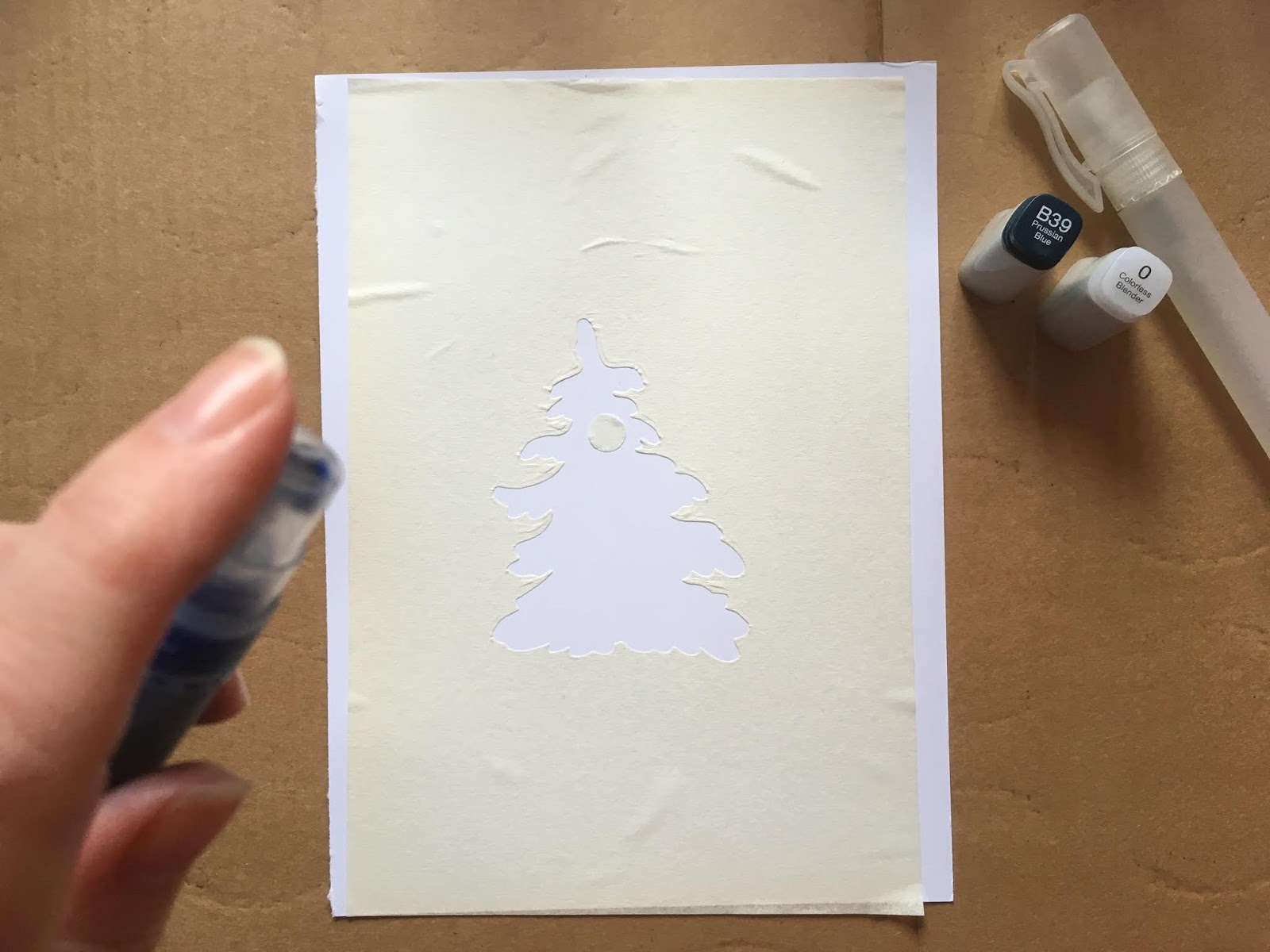
First I created a mask by using the largest Snowy Tree die and a small hole punched circle.
The part of the page I want to make is the area around the tree, I want the tree to be inky!
...then I poured about half and half Colourless Blender and B39 Copic refill into a small spray bottle and gave it a shake.
I sprayed the card, holding the spray bottle well over 25cm's away from it.  (It's a good idea to have a few practice spays on some spare paper first so you can get used to how the ink comes out.  The faster and finer the spray the better the finished image will look).
I sprayed the card a few times until I was happy with how the ink had covered the card and how smooth it looked.
...and here is the fun part!  I hope I'm not the only one who finds this bit exciting!
I slowly peeled the mask away to reveal the tree image!
I have to say, I was fairly happy with the result!  The ink ran little under the mask but I simply pushed the ink back with Copic colourless blender.
...I coloured the little moon with Copic Sketch YR82, YR30, W0
 ...then I trimmed down the image and stamped my Christmas Design!
Here's my completed card!


I hope you have enjoyed this tutorial!

It would be great to see your air brushed backgrounds! Please share your cards with us at Copic Marker Europe by following the link 
HERE
Thank you for popping by!
Enjoy your Copic colouring
from
Sue...xxx

...and...the spray bottle of Copic B39 will keep if the lid is firmly closed so you can use it again, and again....and again!

Monday, November 5, 2018

Skating Rink Backdrop

Hi everyone! Today I am sharing my colouring for a Skating Rink Backdrop stamp. Also on this card I coloured some of the Little Bits Skating Quartet stamps and added them to the backdrop


Before I start to colour a larger area I wet the paper with 0, colourless blender. 


In the darker shaded areas I apply some C1


Over the C1 I applied BG10


I brought in some BV20 and alternated between that and BG10  to make dark areas in the snow


On the skating rink I first applied some C3 to the inner rim, then I dragged it out a little with C1


I went over the C1 and C3 with BG11


I filled in some more of the rink with BG10


Again I used the 0, colourless blender, and smoothed out the colours. 


To add more colour to the rink, I applied some B000


To add more depth, I applied the C3 and C1 again to the edges of the rink. 


On the trees I started with my lightest colour, YG03.
(oops, I coloured in some snow on the tree, I will fix this later)


I then brought in some YG06


For the darkest areas I used YG17


To colour in the snow (and fix where I coloured it green!) I used a white gel pen. 


I coloured 2 little penguins and a North Pole sign, the copics I used are pictured below. 


To finish the card I stuck the penguins and sing onto the rink with 3D foam and added a sentiment from the Holiday Sentiments set. 


Thanks for dropping by, I hope this tutorial inspires you to take out your markers today. 
Sandie
xXx

Thursday, November 1, 2018

Adding Plaid

Hi Everyone, it's Faye here today :)

So, October sneaked out the door and didn't tell me November was arriving. But, November is here and I thought I'd give you a quick step by step on how I add plaid patterning to a fabric.

I am using Stamping Bella Edna Loves the Ocean. I have not coloured her legs as I only want the top half of her for my finished card.

Let's go...


First of all, I need to colour in the swimming costume. Don't go back and keep adding layers, you want to be able to add the plaid without things getting sticky. I start with BG10, as I want to 'plan' where my shading will be.


When I am happy with that, I go straight to my darkest colour, BG57 and go over the top of the BG10.


I am blending this out with BG53.


Finish with BG11 and repeat on the bow and leg frills.


Time for some plaid! Following the shape of the body, draw some lines on the swimming costume with BG57.


Finally, add more plaid patterning with a white gel pen and a black multiliner. Yep, it's that simple!

Copics Used...
Skin; E50, E30, E53, E71
Hair; E97, E99, E09
Hat/ Sunglasses; N3, N5, N7, N9
Lips; R24, R59
Swimming Costume; BG11, BG53, BG57, White Gel Pen, Black Multiliner 0.5

Thanks for stopping by... Have a great day.